
☆ 15+ Years  of Experience
⭐ 4.7  Google rating Google
🔧 650+  repaired last year repaired
15+ Years of Experience
★★★★★ Google rating: 4.7/5 · 226 reviews Checked October 27, 2026
Bay Ridge, Brooklyn
8319 3rd Ave · Bay Ridge

MacBook Screen Repair in Bay Ridge, Brooklyn

If you’re looking for MacBook screen repair in Brooklyn, iFix Bay Ridge is on 3rd Ave in Bay Ridge. We’ve been in business for over 15 years. Walk in Mon–Fri 10–7 or send a request with your model.

  • You see and approve the price before any work starts
  • 30-day limited warranty on most repairs
  • Walk in Monday to Friday, 10 am–7 pm, or pick a time online
  • 650+ devices fixed last year for our neighbors in Bay Ridge

    Start Your Repair

    We repair MacBook screens, including the most common models:

    • MacBook Air
    • MacBook Pro
    • MacBook Pro M1
    • MacBook Pro M2

    Most repairs have a 30-day limited warranty.

    Common Reasons for MacBook Screen Repair

    Based on our many years of experience, here are some of the most common reasons why MacBook screens need to be repaired:

    • Drop damage: This is the most common reason for MacBook screen damage that we see. If your MacBook is dropped, the screen can crack or shatter. The severity of the damage will depend on the height from which the MacBook is dropped and the surface it lands on. If the MacBook is dropped from a high height or onto a hard surface, the screen is more likely to be severely damaged.
    • Liquid or water damage: Although the motherboard is more likely to be damaged, the liquid can damage the screen. The type of liquid that is spilled on the MacBook will also affect the severity of the damage. If the liquid is water, the damage is usually less severe than if the liquid is a corrosive substance, such as coffee or soda.
    • Power surge: If your MacBook is exposed to a power surge, the screen can be damaged. This is because the power surge can cause the screen’s internal components to overheat and fail.
    • Manufacturing defect: In rare cases, MacBook screens fail because of a problem with the LCD panel or backlight. This is usually detected during Apple’s warranty period and can be fixed by Apple.

    In addition to the problems mentioned above, there are several other issues that can occur with a MacBook screen. These include:screen replacement picture
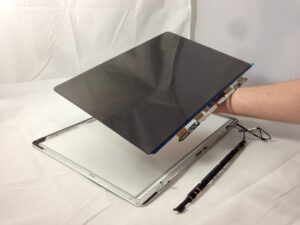
    • Blurry or distorted images: This can be caused by a problem with the screen’s LCD panel or backlight.
    • Dead pixels: These are individual pixels that are stuck on a single color.
    • Ghosting: This is when images from previous screens are displayed on the current screen.
    • Color bleeding: This is when colors from one part of the screen bleed into another part.
    • Backlight bleeding: This is when the backlight of the screen leaks through the edges of the screen.

    Bring your MacBook to iFix Bay Ridge and we’ll check what the screen needs. The price depends on your model and we confirm it before we start. Related repairs: MacBook hinge repair.

    Not sure what’s wrong? Come in and a technician will look at it with you. Pick a time that suits you, and we text you to confirm.

    MacBook Screen Replacement in Bay Ridge

    Most MacBook screen problems are solved one of two ways:

    • Screen replacement: We replace a cracked or shattered MacBook screen. Tell us your model and we’ll confirm the part.
    • Screen repair: Some faults, such as a damaged cable, can be repaired without a new screen. We tell you after the check.

    Call 929-305-0050 or use the form on this page. Most repairs have a 30-day limited warranty.


    List of other MacBook repairs

    FAQ
    Are MacBook screens repairable?

    MacBook screens can be repaired or replaced, depending on the severity of the damage. If the screen is cracked or shattered, it will need to be replaced.

    The cost of repairing a MacBook screen will vary depending on the severity of the damage.

    • A cracked or shattered screen will typically cost more to repair than a cable fault.
    What are the symptoms of a damaged MacBook screen?

    Here are some of the symptoms of a damaged MacBook screen:

    • Cracks or shattered glass: This is the most obvious sign of a damaged MacBook screen.
    • Dead pixels: Dead pixels are individual pixels on the screen that are no longer working. They appear as black or white dots on the screen.
    • Blurred or distorted images: The image on the screen may appear blurry or distorted.
    • Color problems: The colors on the screen may be incorrect or washed out.
    • Light bleeding: Light may bleed from the edges of the screen, making the image appear uneven.
    • Backlight problems: The backlight may be too dim or too bright, making it difficult to see the image on the screen.

    If you notice any of these symptoms, bring your MacBook in. A damaged screen can make the computer hard to use.

    Is it worth it to fix a broken MacBook screen?

    Whether to fix a broken MacBook screen depends on the cost of repair, the severity of the damage, and the age of the MacBook. If the damage is minor, repair may be worth it. If severe, it may be more cost-effective to replace.

      Start Your Repair

      Contacts
      Call Now Start repair Chat
      Chat with a technician 929-305-0050
      📞 Call Now 📝 Quote

      What needs fixing?